
How to remove your personal information from Whitepages step by step
Removing your data from Whitepages starts with one thing: finding the exact URL of your listing. Without it, the suppression form won't work. Here's the full process.
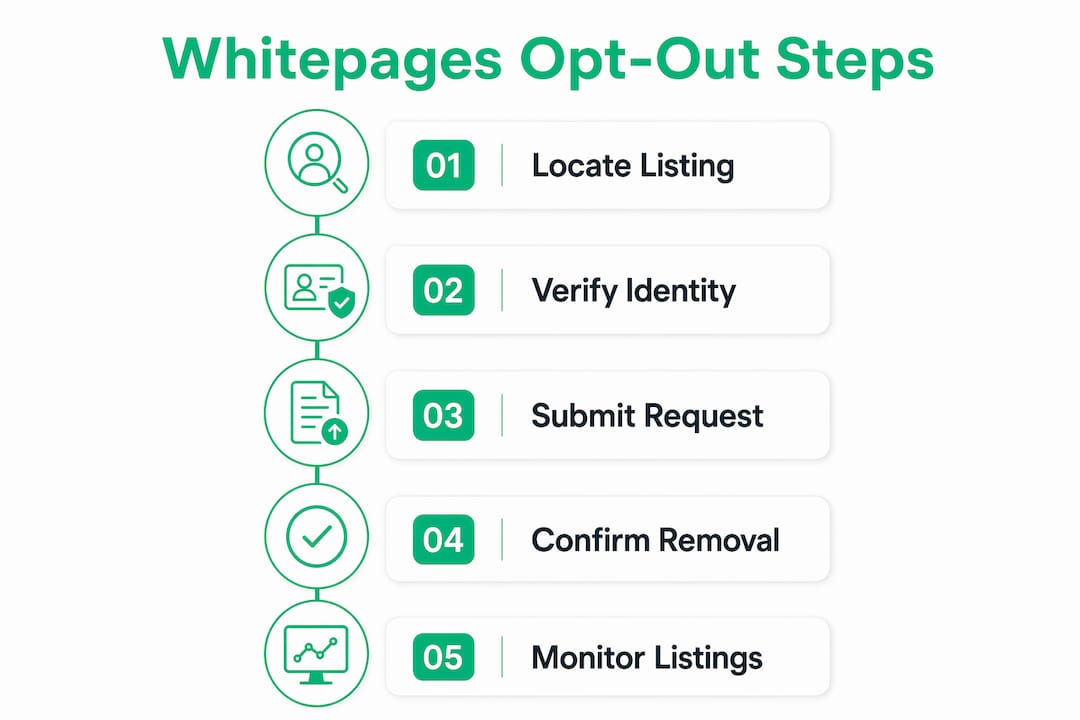
- Find your listing. Go to whitepages.com and search your name plus city and state. Filter results carefully, checking the middle initial, age range, and listed relatives to confirm it's actually you.
- Copy the profile URL. Once you're on your profile page, copy the full URL from your browser's address bar. This is the identifier Whitepages uses to locate the exact record.
- Open the suppression form. Go to whitepages.com/suppression-requests, paste your URL into the field, and click "Next."
- Select a removal reason. Pick any reason from the dropdown. You don't need to explain yourself in detail.
- Enter your phone number. Whitepages requires a phone number for verification via automated call. Enter the code shown on your screen when the call comes through.
- Submit and confirm. After verification, your request is logged. Whitepages processes confirmed opt-outs within 72 hours, though many listings come down within an hour.
- Repeat for every listing. Whitepages does not allow bulk removal. Each separate listing requires its own request. If you find three profiles with your name, you submit three separate forms.
- Follow up if data reappears. Check back after a few days. If your listing returns, submit a new request through the same form or email privacyrequest@whitepages.com.
Pro Tip: Before pasting your profile URL into the suppression form, run it through a link-cleaning tool to strip any extra tracking parameters. The form is strict about URL format and will reject anything that looks off.
What makes Whitepages removal harder than it looks
The opt-out process works, but it's built with friction. Privacy experts note that manual opt-out forms are deliberately complex, which discourages users from repeating the process every time their data resurfaces.
- No bulk removal option. Every listing is its own request. If you've lived in multiple cities, you may find several profiles, each requiring individual action.
- Phone verification is mandatory on the standard form. There's no email-only path through the suppression form itself. If you'd rather not share your phone number, you can email privacyrequest@whitepages.com directly or submit a support ticket instead.
- Data keeps coming back. Whitepages continuously refreshes its database from public records and telecom feeds. A listing you removed in March can reappear by June because a new public record triggered a fresh entry.
- Premium listings need a separate check. Removing your standard listing uses the same opt-out process as premium listings, but you need to verify both are gone after 72 hours. If a premium listing persists, email privacyrequest@whitepages.com with both URLs.
- Verification calls can fail. If the call doesn't arrive within five minutes, check whether your phone blocks unknown numbers. You can request a new code through the form or switch to the email route entirely.
- Re-listings are normal, not a sign your request failed. When data reappears, it usually means Whitepages pulled your information from a fresh telecom or public-record feed, not that your original opt-out was rejected.
Pro Tip: If the standard form keeps rejecting your URL, paste it into a plain-text editor first to strip hidden formatting, then copy it fresh before submitting.

What you should know about your privacy rights before opting out
The Whitepages opt-out is free, and no account or purchase is required to submit a request. That's worth stating plainly because the site's design can make it feel otherwise.
- Your phone number stays private. Whitepages uses it solely to complete the opt-out. It won't be used for marketing or shared with third parties.
- You can opt out of data sales simultaneously. Using the automated suppression tool removes your listing and also opts you out of the sale or sharing of your personal information, covering both concerns in one step.
- Authorized agents can submit requests. If someone is acting on your behalf, they'll need signed written permission, and Whitepages may require you to independently verify your identity as well.
- Once removed, linked listings are also suppressed. According to Whitepages' own consumer privacy policy, all known connected listings are removed and your data will not be sold in any capacity after a confirmed opt-out.
- U.S. privacy laws back your right to remove. The California Consumer Privacy Act (CCPA) gives California residents explicit rights to delete and opt out of data sales. Even outside California, you can reference applicable U.S. privacy laws when emailing your removal request to strengthen your case.
- Processing is usually fast. Most removals complete well within the stated 72-hour window, often within a few hours of phone verification.
How Gdcs helps you go further than a one-time opt-out
A single Whitepages removal is a start, not a finish. Because new public data captures cause listings to reappear even after a successful opt-out, ongoing monitoring is what actually keeps your information off people-search sites.
Gdcs (Tethra) was built for exactly this situation. Its Leak Sweep tool actively scans data brokers and people-search sites for exposed personal information, then generates legal removal letters to send on your behalf. You don't have to hunt down every URL manually or remember to recheck every few months.
Beyond removal, Gdcs flips the dynamic entirely. Instead of just protecting your data from being sold without your consent, the platform lets you earn royalties when brokers purchase your consent-backed information. Features like Oracle and Multiplier connect your financial, social, and utility data streams to increase your payouts. The wallet-based system tracks your earnings and keeps everything GDPR-compliant.

For anyone managing their personal data across multiple brokers, Gdcs's data broker tools handle the repetitive opt-out cycle automatically, so you're not starting from scratch every time a listing reappears.
Keeping your data off Whitepages for good
Removing each Whitepages listing individually via a verified opt-out request is the only way to get your data down. Expect processing within 72 hours, but plan for repeat requests because data refreshes are continuous, not a one-time event.
- Submit a separate opt-out for every listing URL you find under your name.
- Use the email route (privacyrequest@whitepages.com) if phone verification isn't an option for you.
- Check back after removal and resubmit if your listing reappears.
- No account or purchase is needed. Your privacy rights cover this at no cost.
- Manual opt-outs work, but they're temporary by design. Automated monitoring closes the gap that manual removal leaves open.
- Gdcs combines continuous scanning, legal removal letters, and data monetization so your personal information works for you instead of against you.
Key Takeaways
Removing your data from Whitepages requires individual opt-out requests per listing, phone verification, and ongoing monitoring because data refreshes cause re-listings even after confirmed removals.
| Point | Details |
|---|---|
| One request per listing | Whitepages has no bulk removal; submit a separate opt-out for every profile URL you find. |
| Processing within 72 hours | Most removals complete faster, often within a few hours of phone verification. |
| No cost, no account needed | The opt-out is free and requires no Whitepages account or purchase to complete. |
| Data reappears regularly | Public records and telecom feeds trigger new listings, making ongoing monitoring necessary. |
| Automated tools close the gap | Gdcs's Leak Sweep and legal removal letters handle recurring exposures without manual effort. |